
The Simple Fix for Substack’s Biggest Secret Mistake: How-To Setup Your "Welcome Email"
...and how to Get More Readers to Actually Open Your Email & Newsletters!

Why should you fix your Substack “Welcome Email” right now! Because you spent hours staring at your computer screen, you picked out your newsletter name, uploaded a nice photo, and finally clicked that scary “Publish” button on your very first post.
You sent the link to your friends, family, and Facebook groups. You see a few people have signed up! You feel amazing. You think the hard part is officially done.
But here’s the catch: A lot of people type in their email address, click “Subscribe,” and then completely forget who you are five minutes later.
Why? Because the default standard Substack settings automatically sends them a robotic, boring “Welcome Email” that looks like a receipt from a grocery store. It tells them to download an app, take a survey, or click five different buttons all at once. It’s overwhelming, confusing, and it makes people close the email immediately.
If you want people to actually read your writing, and eventually pay you for it, you need to fix this first email. Let’s walk through exactly how to change it, step-by-step, without needing any tech genius skills.
Step 1: Turn Off the Confusing Noise in the Substack Welcome Email
When a brand-new person joins your newsletter, they are excited about you. But Substack’s default system immediately clutters that excitement by sending an email packed with tech-heavy distractions:
A big banner begging them to download the Substack App.
A button asking them to take a “New Reader Survey.”
A bright purple button asking them to pay you money before they’ve even read your work.
When people see too many buttons, their brains get tired. They don’t click any of them. They just close the email.
The Fix: You need to make this email do just one job. Its only job is to give them something wonderful to read right now so they remember why they signed up in the first place.
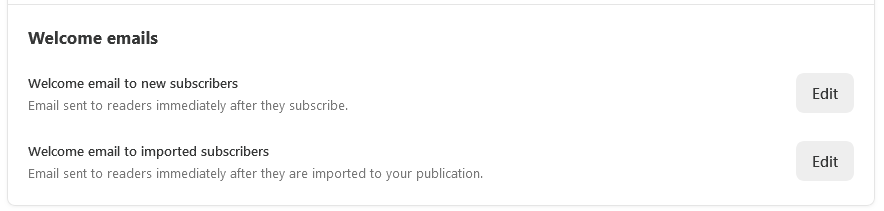
Step 2: The “Friendly Hello” Recipe
Go into your Substack settings, find the box that says “Welcome Email,” erase whatever is in there, and write a simple email using these three easy steps.
1. Remind Them Why They Are Here (The First Paragraph)
Don’t just say, “Thanks for subscribing!” Remind them what your newsletter is about.
Instead of: “Thanks for joining my newsletter where I write about cooking.”
Try this: “You’re officially on the list! Every single week, I’m going to send you one incredibly simple, delicious recipe that takes less than 30 minutes to make, so you can stop stressing about dinner.”
2. Show Them Your Best Work (The Middle)
Don’t make them wait a whole week for your next email. Give them your best stuff immediately. Pick 2 or 3 of your favorite articles you’ve already written, and put the links right here.
Example: “While you wait for next week’s recipe, here are the 3 most popular dishes our community loves: [Link to Recipe 1], [Link to Recipe 2], [Link to Recipe 3].”
3. Tell Them When to Expect You (The End)
People like routine. Tell them exactly when you will show up in their inbox so they look out for you.
Example: “I will slide into your inbox every single Tuesday morning at 9:00 AM sharp. See you then!”
Step 3: How to Keep Your Substack Emails & Newsletters Out of the “Junk” Folder
This is the most important part, and it requires a little “secret handshake” with the computers at Google and Yahoo.
When Substack sends your emails, computers like Gmail often think, “Oh, this is just a robot blasting out junk mail,” and they throw your newsletter into the dreaded Promotions Tab or Spam Folder where nobody ever looks.
To trick Gmail into realizing you are a real human and not a robot, add this exact sentence to the very bottom of your welcome email:
"To make sure my emails don't get lost in your spam folder, please hit 'Reply' to this email right now and just type the words 'Got it!' It tells Gmail that we are friends."
Why This Little Trick Works:
When a reader clicks “Reply” and sends you a two-word message, Gmail’s system thinks, “Oh wow, these two people are talking to each other! They must know each other.”
From that day forward, Gmail will almost always put your newsletters right into their Primary Inbox (the main screen they look at every day) instead of burying it in the junk pile. Plus, it gives you a lovely chance to say hello to your new readers!
Your 10-Minute Homework Checklist
Don’t let the technology scare you. Log into your Substack tonight, click on your dashboard and go to Settings, scroll down until you see Welcome Email, and do these four things:
Delete the extra stuff: Keep it simple. No giant pictures, no confusing links.
Say hello clearly: Tell them exactly what your newsletter promises to do for them.
Share your favorites: Put links to 2 or 3 of your best past posts.
Ask for a reply: Add that magic sentence asking them to reply “Got it!”
By making these simple changes, you will instantly look more professional than 90% of the other writers on the platform, and your readers will actually look forward to opening your emails every week.
Paul Arino
Substack Growth Tips | How To Grow
If you want a step-by-step roadmap to turn your publication into an organic traffic magnet, check out these actionable Substack SEO and growth tips to optimize your newsletter for Google Search.
One more question I keep getting asked is 'Will customizing my Substack welcome email stop my newsletters from going to the spam folder?'
The short answer is yes, absolutely!
When you fix your Substack welcome email setup using the steps above and remove the robotic layout, your initial open rates will skyrocket. This is incredibly important for your overall domain health and email deliverability.
When a new subscriber opens your very first email right away, it signals to email providers like Gmail and Apple Mail that your newsletter content is safe, wanted, and highly engaging. This single action drastically reduces the chances of your future Substack posts being filtered into the 'Promotions' tab or the dreaded spam folder.
If you are currently mapping out your automated welcome email, I highly recommend keeping the text clean, asking a simple question to encourage a reply (which further boosts deliverability), and letting your writing do the heavy lifting!